E Shram Card 2026 – Download Check Balance Online Registration Status Check and Benefits at eshram.gov.in
Welcome to the most comprehensive guide on the e-Shram card. If you are an unorganized worker in India, this card is your gateway to government social security schemes, financial aid, and insurance coverage. In this guide, we will explain everything from e shram card online apply steps to how you can perform an e shram card download in just a few minutes.
E Shram Card Online Apply : Step-by-Step Guidelines
The e shram card online apply process is completely FREE. Follow these steps to register yourself today.
Phase 1: Preparation
Make sure you have your Aadhaar card, bank account passbook (with IFSC code), and your Aadhaar-linked mobile number ready.
Phase 2: The Self-Registration Process
- Visit the Official Portal: Go to register.eshram.gov.in.
- Enter Mobile Number: Type in your Aadhaar-linked mobile number and the Captcha code.
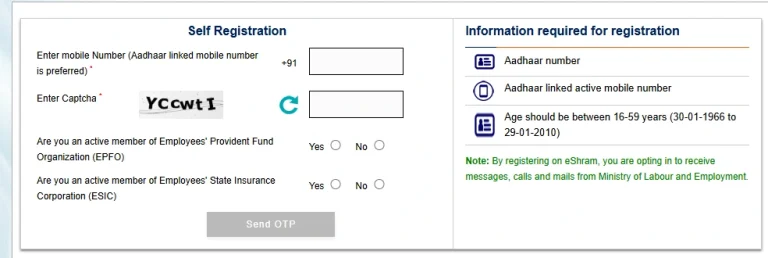
Note: If your mobile is not linked to Aadhaar, you must visit the nearest Common Service Centre (CSC) for biometric registration.
E Shram Login Portal
Login into the e-Shram portal is the first step to managing your profile, checking your payment status, or accessing new government schemes. In 2026, the login process has been streamlined through the “One Stop Solution” dashboard, which integrates jobs, skills, and pension services into one place. You can choose any one of the following step for login.
Login via Aadhaar & Mobile Number (Most Common)
If you don’t remember your UAN number, this is the easiest way to access your account.
Login via UAN Number (Direct Access)
If you have your 12-digit Universal Account Number (UAN) handy, you can log in directly without re-entering your Aadhaar details.
The “One Stop Solution” Login (New for 2026)
This new login feature is designed for workers who want to do more than just manage their card.
CSC Login (For Digital Seva Agents)
If you are a Common Service Centre (CSC) operator helping workers, the login process is different:
Eligibility Criteria for the E Shram Card?
Before you start the e shram card registration process, check if you meet these official eligibility criteria:
| Requirement | Details |
| Age Limit | Between 16 to 59 years. |
| Worker Type | Must be an Unorganized Worker (not a government employee). |
| Tax Status | Should not be an Income Tax payer. |
| Social Security | Should not be a member of EPFO, ESIC, or NPS (Govt. funded). |
| Documents | Must have an Aadhaar Number and a mobile number linked to it. |
E Shram Card Download : Download in PDF Format
If you have already registered and need a new copy, the e shram card download process is simple.
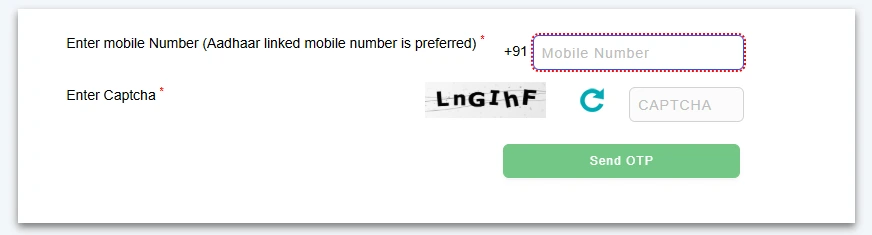
Download E Shram Card by UAN Number Step by Step Guide
Follow the below steps to download E-Shram card by UAN Number.
Visit the Official Portal: Go to the official e-Shram website at eshram.gov.in.
Navigate to the Update Section: On the homepage, look for the section titled “Already Registered? Update” and click on it.
Access via UAN: Instead of entering your mobile number, look for the link or tab that says “Download UAN Card” or “Update Profile using UAN”.
Enter Your Details:
- Input your 12-digit UAN number.
- Enter your Date of Birth exactly as it appears on your card.
- Enter the Captcha code shown on the screen.
OTP Verification: Click on “Generate OTP.” A One-Time Password will be sent to your Aadhaar-linked mobile number.
Download the PDF: Once verified, your dashboard will open. Click the green button labeled “Download UAN Card” to save your e-Shram card as a high-quality PDF on your device.
how to Download E Shram Card by Aadhaar or Phone Number
Follow the below steps to download E Shram by using Aadhaar or phone number.
Step 1: Visit the Official Portal
Start by going to the official government website: eshram.gov.in.
Step 2: Navigate to the “Update” Section
On the home page, locate and click on the link that says “Already Registered? Update”. This will redirect you to the self-registration authentication page.
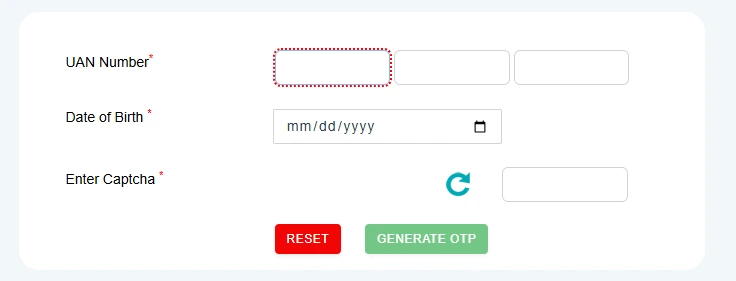
Step 3: Enter Your Registered Mobile Number
- In the first box, enter the mobile number that is linked to your Aadhaar.
- Enter the Captcha code exactly as shown on the screen.
- Click on “Send OTP”.
Step 4: Verify with OTP
- You will receive a 6-digit One-Time Password (OTP) on your mobile phone.
- Enter the OTP in the box and click “Submit”.
Step 5: Enter Your Aadhaar Number
- Now, you will be asked to enter your 12-digit Aadhaar Number.
- Select “OTP” as your preferred authentication method (unless you have a fingerprint scanner attached to your computer).
- Enter the new Captcha and click “Submit”.
- Enter the final OTP received from Aadhaar (UIDAI) and click “Validate”.
Step 6: Download the UAN Card
- After validation, your profile dashboard will open.
- You will see two options: “Update Profile” and “Download UAN Card”.
- Click on “Download UAN Card”.
- Your e-Shram card will appear on the screen. Click the green “Download UAN Card” button at the top right to save the PDF.
How to Check E Shram Card Balance and Payment Status
Many workers search for e shram card check balance to see if government aid has arrived. You can check your balance or payment status by using Aadhaar number also. Check out below methods as well.
- Online Method: Log in to the portal using your UAN or mobile number and check the “Payment Status” or “My Account” section on the dashboard.
- Bank Method: Since benefits are sent via DBT, you can check your linked bank account balance through your bank’s passbook, ATM, or mobile app.
UMANG App: You can also link your e-Shram details to the UMANG app to track scheme benefits on your smartphone.

What is the E Shram Card Scheme
The e-Shram card (also known as the Shramik Card) is a national identification card for workers in the unorganized sector. Launched by the Ministry of Labour and Employment, it creates a massive database of workers , including construction laborers, migrant workers, street vendors, and domestic help to ensure they receive government benefits directly without any middlemen.
When you register, you receive a unique 12-digit Universal Account Number (UAN) that is valid across all of India for your entire life.
E Shram Card Benefits
Understanding the e shram card benefits is the first step to securing your financial future. The government has integrated several schemes into this single card to make it a “One-Stop Solution” for workers.
1. Accidental Insurance Cover (PMSBY)
Every registered worker is eligible for the Pradhan Mantri Suraksha Bima Yojana (PMSBY):
- ₹2 Lakh in case of accidental death or permanent total disability.
- ₹1 Lakh in case of partial permanent disability.
2. Monthly Pension after Age 60
Through integration with the PM-SYM (Pradhan Mantri Shram Yogi Maandhan) scheme, workers can receive a guaranteed monthly pension of ₹3,000 after they turn 60. This requires a small monthly contribution based on your entry age.
3. Direct Benefit Transfer (DBT)
During national crises or pandemics, the government can send financial aid directly to the bank account linked to your e-shram card. This ensures you get the full amount without any delays.
4. Portability of Benefits
If you are a migrant worker moving from one state to another, your benefits follow you. You don’t need to re-register when you change your work location.
5. Access to Jobs and Skills
As of 2026, the portal now links you directly to the National Career Service (NCS) for job opportunities and Skill India for free vocational training.
E Shram Card Update: Correction of Mistakes Online
If your address or bank details have changed, you can perform an e-shram card update online.
List of Workers Who Can Apply
The e-shram card is for anyone in the “Unorganized” workforce. This includes over 400 different occupations, such as:
Who are Unorganized Workers?
This includes millions of people, such as:
E Shram Card Common Problems and Solutions
Many workers face issues during the e shram card registration process. Here is how to fix the issues.
